



poiplaza logo
Log in/Registration
username:
password:

Navigon

1 Download and install the POI-Warner application available here: http://www.navigating.de/cms/index.php?id=636.

2 Unpack and copy the downloaded POI files (.bmp and .asc extensions) to the \POIWarner\pois folder.

3 Launch the POI-Warner program. Select the POI-Manager > POI-Settings > Overlay Settings menu items to activate the desired POIs.
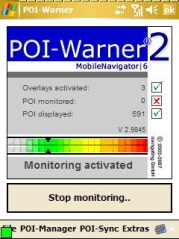
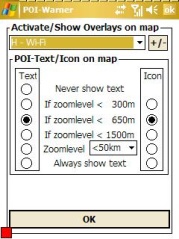
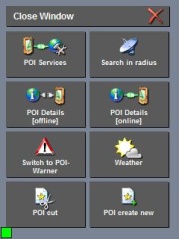
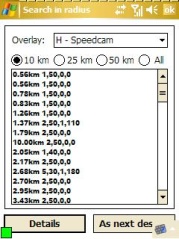
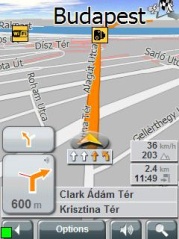

4 Launch the Navigon application. Click on the green square to select the "Search in radius" menu item.


5 Select it "As next destination".


6 Launch navigation.


Note: The POI may be displayed as an inaccessible location if the map you are using is not sufficiently detailed.


© all rights reserved - privacy policy - useful links - about        
  • Arabic Arabic
  • Bulgarian Bulgarian
  • Catalan Catalan
  • Chinese Chinese
  • Croatian Croatian
  • Czech Czech
  • Danish Danish
  • Dutch Dutch
  • Filipino Filipino
  • Finnish Finnish
  • French French
  • German German
  • Greek Greek
  • Hebrew Hebrew
  • Hindi Hindi
  • Indonesian Indonesian
  • Italian Italian
  • Japanese Japanese
  • Korean Korean
  • Latvian Latvian
  • Lithuanian Lithuanian
  • Norwegian Norwegian
  • Polish Polish
  • Portugese Portugese
  • Romanian Romanian
  • Russian Russian
  • Serbian Serbian
  • Slovak Slovak
  • Slovenian Slovenian
  • Spanish Spanish
  • Swedish Swedish
  • Ukrainian Ukrainian
  • Vietnamese Vietnamese